
# Typing Effect
Type effect allows you to send a "typing..." indicator to your client.
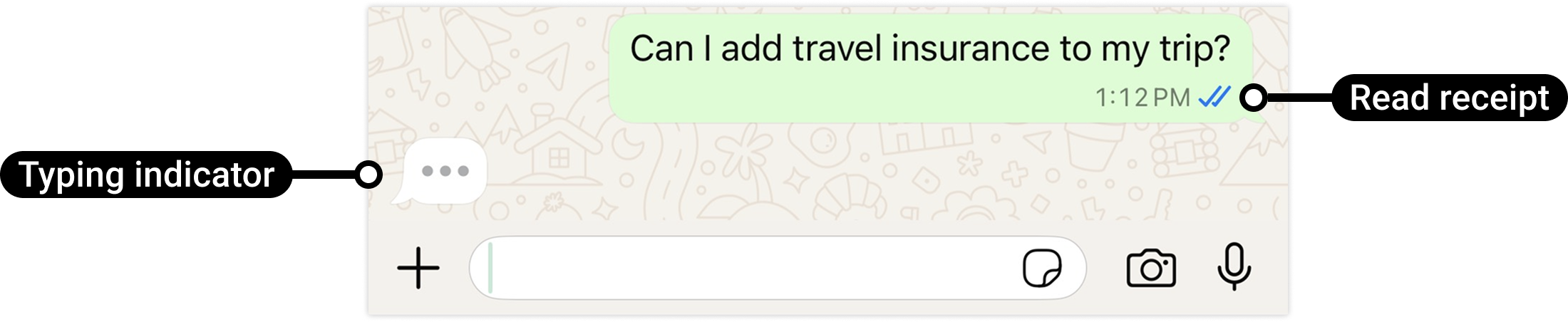
The "typing..." indicator gives a more live feeling to the conversation, especially if you are building a chat bot.
# Remarks
- The typing effect will be dismissed once you send an actual message (
sendMessageor any other) or if 20 seconds have passed, whichever comes first. - To prevent your client from waiting in the chat, it is better to use the typing indicator just a few moments before you actually send a response.
- The typing indicator is not an on/off feature for your entire WhatsApp number — this endpoint needs to be called every time you wish to create this effect.
- This can only be sent when a session is open between you and the client (24 hours session). Meaning, the client must have sent you a message in the last 24 hours.
- When using the typing effect, the message that the user sent to you will automatically be marked as "read" (two blue check marks) so the user knows your API has read the message and is preparing a response.
- Best practice is to use this when running an AI bot, where the answer takes a bit of time to generate, or when you wish to keep the user in the chat while preparing an answer.
- The typing effect is not yet supported for all WhatsApp API accounts.
- Avoid sending too many typing effects to the same user without sending an actual message, for a better user experience. (No hard limit, just a suggestion.)
- Avoid sending a typing effect if you reply within less than 1 second, for a better user experience. (No hard limit, just a suggestion.)
# Endpoint
POST https://019sms.co.il/whatsapp-api/typing
# Header
| Name | Type | Required |
|---|---|---|
| Authorization | Bearer authentication | ✔️ |
| Content-Type | application/json | ✔️ |
# Parameters
| Name | Type | Description | Required |
|---|---|---|---|
| source | string | your WhatsApp account. international number without +. for example: 972771234567 | ✔️ |
| destination | string | The number you want to send the typing effect to | ✔️ |
# Response
json
Copy code
    POST whatsapp-api/typing HTTPS/1.1
Content-Type: application/json
{
    "success": true,
    "ans": {
        "status": "OK",
        "unique": "HBgMOTcyNTI2ODkzMjQ1FQIAERgSRdDU4RjIyQjY2MEI5NUVEMUM4AA==",
        "from": 972555555555,
        "to": "972550000000",
        "reason": 1
    }
}
# Parameters
| Name | Type | Description |
|---|---|---|
| success | boolean | The status of request. |
| unique | string | The unique ID for the request, for webhook notification |
| reason | number | reason is the status explanation in case of FAIL |
# Status explanation
| Status | Description |
|---|---|
| 1 | not FAIL. the status is OK |
| 2 | Your "from" number account does not exist, or JSON syntax error |
| 3 | General error |
| 4 | 'to' is empty or wrong |
| 6 | Error sending typing effect, please contact support |
| 7 | You are trying to use typing effect but it has been more than 24 hours since client's last message. please wait for a message from the client |